// Project
Color Accessibility Checker
A full-palette contrast ratio matrix that tests every foreground/background combination against WCAG standards, so you can audit an entire color system at a glance.
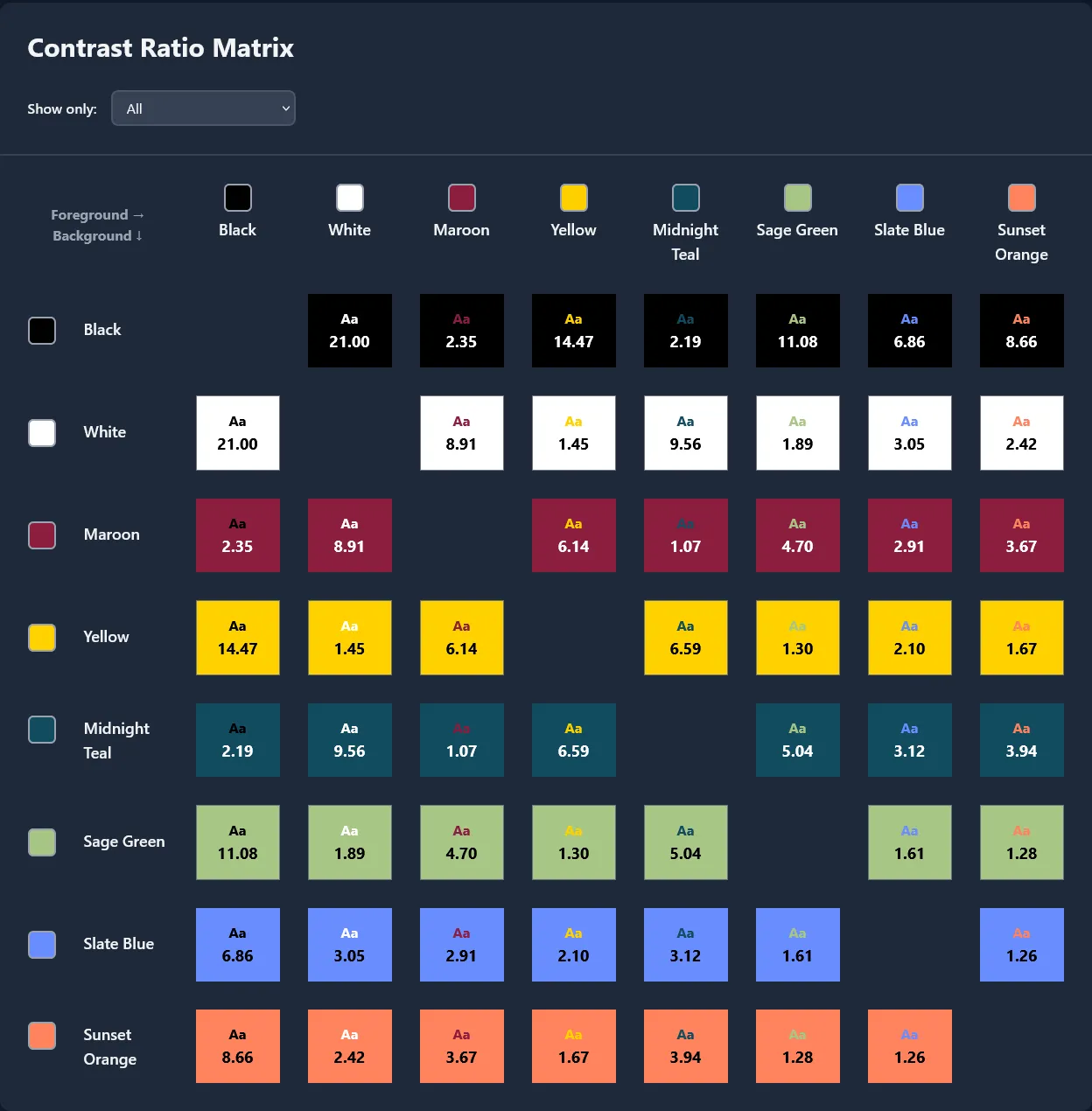
I'll be honest, for years I checked color contrast the slow way. I'd pick two colors, plug them into a checker, read the result, then do it again for the next pair. It worked, but with a palette of eight or ten colors, that's dozens of combinations, and that's time I'd rather spend building. This tool came out of that frustration. It takes your entire palette and builds a contrast ratio matrix, every foreground against every background, all at once, so you can see at a glance which pairings pass WCAG and which ones don't.
Why I Built It
Accessibility isn't something I bolt on at the end of a project. Whether I'm building a marketing site, a SaaS dashboard, or a custom WordPress theme, one of the first things I do is audit the color palette against WCAG contrast requirements. The problem is that most tools only let you test two colors at a time. That's fine for a quick spot-check, but it falls apart when you're working with a real palette: the kind with brand primaries, secondaries, neutrals, and a couple of accent colors. I wanted something that would let me define the palette once and immediately surface every combination that falls short.
How It Works
You add colors through a simple form: a name and a hex code. The app takes that palette and generates a full matrix where every color is tested against every other color as both foreground and background. Each cell shows the calculated contrast ratio alongside a live text preview, so you're not just reading a number. You can see exactly how legible the pairing actually is.
There's a filter that lets you narrow the view to only the combinations that meet a specific threshold: 4.5:1 for WCAG AA normal text, or 3:1 for large text. This is the feature I use most. When a client sends over a brand guide and I need to know which text/background pairings are safe for body copy, I toggle the filter and the matrix highlights exactly what I'm looking for.
Palettes are saved to local storage automatically, so they're still there when you come back. You can also share them: copy to clipboard as JSON, paste one in from a colleague, export to a file, or import from one. I built in a manual JSON editor too, which is handy for quick tweaks when you just need to swap out a single hex value without going through the form.
The whole app supports light and dark mode.
Under the Hood: The Contrast Calculation
The contrast ratios follow the WCAG 2.1 specification exactly, and I implemented the pipeline from scratch rather than pulling in a library. Partly to keep the bundle small, and partly because I wanted to understand precisely what was being calculated.
The math works in four steps. First, each hex code is parsed into its
red, green, and blue components. Then each channel is converted from the
sRGB color space to linear light using the standard gamma correction
formula. This accounts for the fact that sRGB values aren't linearly
proportional to the light your screen actually emits. From there, the
three linearized channels are weighted (0.2126R + 0.7152G + 0.0722B) to produce a single luminance value that models how the human eye
perceives brightness. Green contributes far more than red, and red far
more than blue. Finally, the lighter and darker luminance values are
plugged into the WCAG formula: (L1 + 0.05) / (L2 + 0.05),
producing a ratio between 1:1 (identical colors) and 21:1 (black on
white).
Technical Details
The front end is React 19 with TypeScript, using a straightforward props-down architecture. The palette state lives in the top-level App component and flows into the Palette and Combinations components. Styling is Tailwind CSS 4 via the Vite plugin, including full dark mode support with class-based toggling. The build toolchain is Vite 7, with path aliases to keep imports clean. Tests run on Vitest with Testing Library and jsdom. The whole thing is deployed on Cloudflare Workers, so it loads fast no matter where you are.